
Does Zonify Support Wordpress Woocommerce?
Yes, we added support for WooCommerce.
To download and install the Zonify app in your WooCommerce store, follow the steps below:
Click here to download the Zonify plugin from the WordPress Marketplace
Or login to your WordPress admin dashboard, click the "plugins" from the side menu, click "add new" and search the Zonify plugin. (screenshot below)
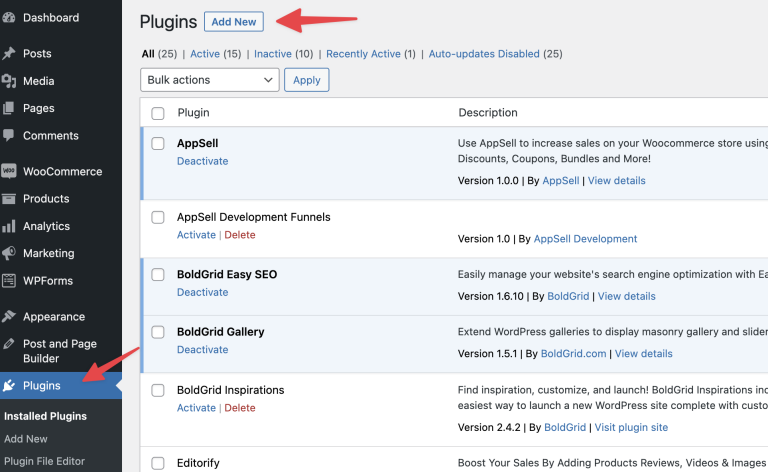
If you downloaded the plugin, click "upload" button and install the app.
if you searched the Zonify app through the marketplace, click the "install now" button, and click the "activate" button (screenshot below)
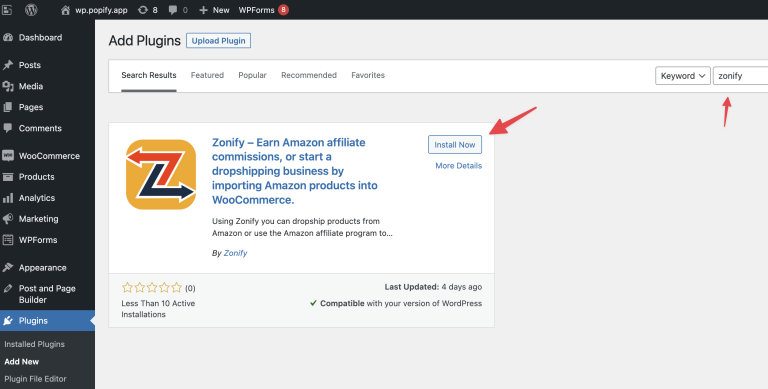
after installing/activating the app, the Zonify app will be added to your WordPress side menu, click it and you will be redirected to the Zonify dashboard.
Subscribe to one of our plans and start adding products to your store.
Still stuck? Email support@zonify.app and include your store URL.