
How to integrate amazon affiliate program with Zonify?
In This guide we will show you how to integrate Zonify with the Amazon affiliate program.
Which means, at the end of the process you'll be able to switch the "buy it now" button to "View on amazon" and redirect your users to buy the product on Amazon.
Note - This guide works on Shopify free themes, custom theme might need different process.
Steps
1. Open your Shopify admin dashboard.
2. Click "Online Store".
3. Click "Themes".
4. Select Actions/Edit code
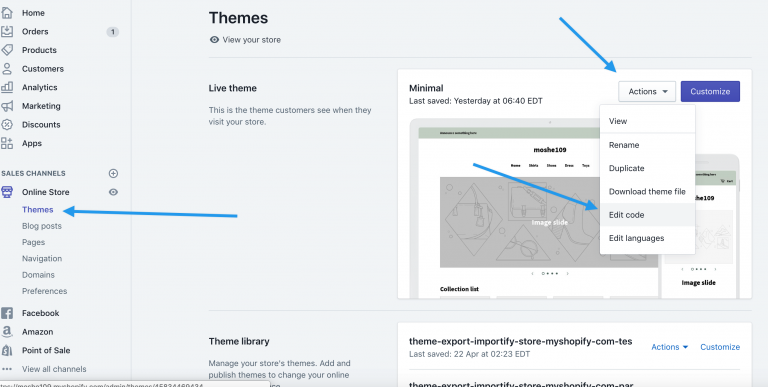
6. Search the file product-template.liquid in the Sections folder and click it.
7. The code editor window will be on the right side, use the CTRL-F on windows or Command f on Mac and search the "add-to-cart" button or "AddToCart"
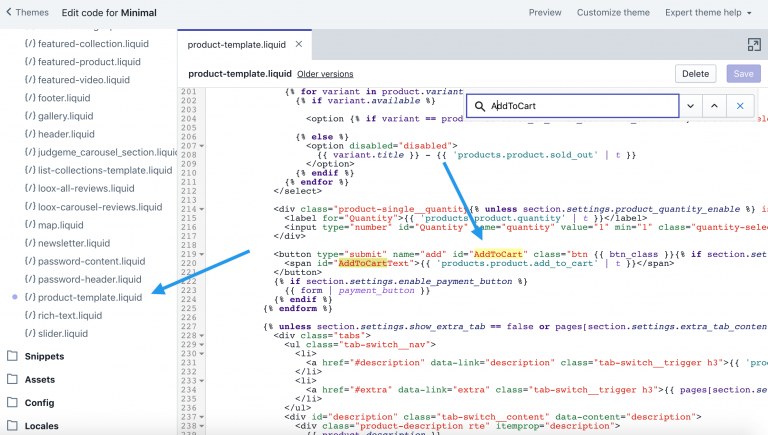
Important: if you can't find it on this file, try to search it on
Folder -> Templates, file name -> product.liquid
Folder -> Snippets file name -> product-form.liquid or product-options.liquid
Folder -> Sections file name -> product.liquid
8. Below the </button>, insert the code
{% include 'zonify' %}
Check the screenshot
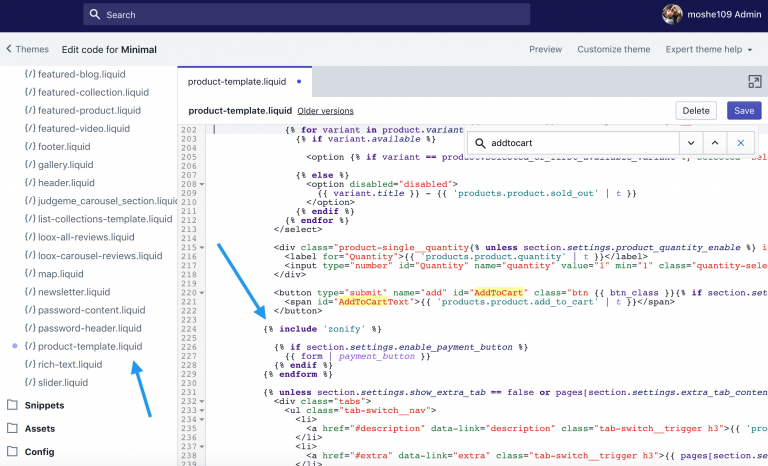
And click Save,
If your'e facing any issues, you can contact us
Still stuck? Email support@zonify.app and include your store URL.